
Computer Skills for Resume: What to List (2026)
"Proficient in Microsoft Office." That phrase sits on roughly half the resumes in circulation, and it tells a hiring manager almost nothing. Can you build a financial model in Excel with pivot tables and VLOOKUP, or can you type a letter in Word? Those are vastly different skill levels hiding behind the same generic line.
Computer skills on a resume have a specificity problem. The term covers everything from basic email and file management to advanced programming, database administration, and cloud architecture. Listing "computer skills" without specifying which ones — and at what level — is like listing "food" as a cooking skill. It is technically true and practically useless.
This guide covers which computer skills to put on your resume in 2026, how to organize them so both the ATS and the hiring manager find what they need, which computer skills are most in demand by industry, and how to describe your computer proficiency without sounding generic.
What Are Computer Skills?
Computer skills are the abilities you use to operate software, hardware, and digital tools in a professional setting. They range from basic computer literacy — using a keyboard, navigating an operating system, managing files, sending email — to advanced technical skills like programming, data analysis, database management, and software development.
On a resume, computer skills typically fall into two categories:
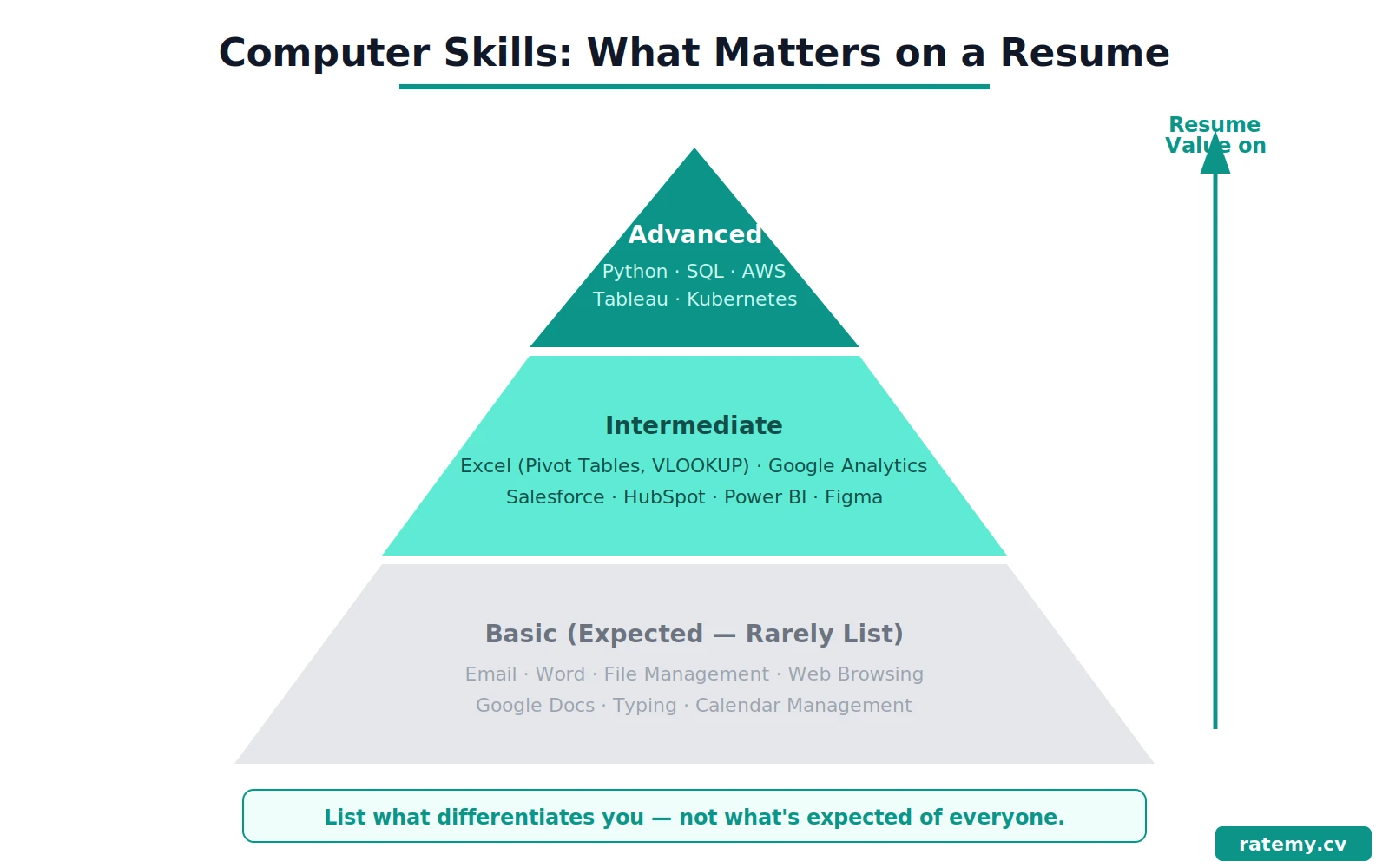
Basic computer skills are the foundational abilities that nearly every office job requires: word processing, spreadsheet software, email, file management, web browsers, and basic troubleshooting. These are table stakes — expected but rarely impressive on their own.
Advanced computer skills are specialized abilities that differentiate you: programming languages, data analysis tools, graphic design software, database management, CRM platforms, ERP systems, and industry-specific applications. These are what hiring managers actually scan for.
The distinction matters for your resume because basic and advanced skills should be listed differently. Basic skills can be mentioned briefly or woven into your experience bullets. Advanced skills deserve prominent placement in your skills section with specific tool names and, ideally, evidence of proficiency in your experience bullets.
Best Computer Skills to List on Your Resume in 2026
Microsoft Office and Productivity Software
Microsoft Office remains the most commonly listed computer skill on resumes — and the most commonly listed badly. "Proficient in Microsoft Office" is so generic it has lost all meaning. Instead, list the specific applications you use and the features that demonstrate real skill:
Microsoft Excel: Pivot tables, VLOOKUP/XLOOKUP, conditional formatting, Power Query, macros, VBA, data modeling, charts, formulas. Excel proficiency is one of the most searched-for computer skills in job descriptions across finance, operations, marketing, and administration.
Microsoft Word: Document formatting, styles, mail merge, track changes, templates, table of contents generation. Useful but rarely a differentiator on its own.
Microsoft PowerPoint: Deck design, data visualization, slide masters, animations. Relevant for client-facing and leadership roles.
Microsoft Outlook: Calendar management, email organization, meeting scheduling. Basic but worth mentioning for administrative and coordination roles.
Google Workspace alternative: Google Sheets, Google Docs, Google Slides, Gmail, Google Drive. If the company uses Google Workspace instead of Microsoft Office, listing these specifically shows you can work in their environment.
Resume example: Built weekly executive dashboard in Excel using pivot tables, VLOOKUP, and conditional formatting to track 12 KPIs across 4 departments — adopted by the leadership team as the standard reporting format, replacing a manual PowerPoint process.
Spreadsheet and Data Skills
Spreadsheet proficiency is worth calling out separately from "Microsoft Office" because it signals analytical capability. Hiring managers in finance, operations, marketing, and project management actively search for candidates who can work with data in Excel or Google Sheets.
Beyond basic formulas, the spreadsheet skills that carry weight include: pivot tables, data validation, complex formulas (INDEX-MATCH, SUMIFS, array formulas), Power Query for data transformation, charting and data visualization, and macro automation.
Resume example: Automated monthly expense reconciliation using Excel macros and Power Query, reducing processing time from 6 hours to 45 minutes and eliminating manual data entry errors across 3 cost centers.
Data Analysis and Visualization Tools
For roles that involve working with data — and that is an increasing number of roles — listing data analysis and visualization tools on your resume signals that you can go beyond spreadsheets. The most in-demand tools include:
Tableau and Microsoft Power BI for dashboard building and data visualization. SQL for querying databases. Python (pandas, NumPy) and R for statistical analysis. Google Analytics for web and marketing data. Google Looker Studio for reporting.
These are advanced computer skills that command premium positioning on your resume. If you have them, list them prominently — they set you apart from candidates who only know Excel. For deeper guidance on listing these tools, see our guides on data analysis skills, Power BI skills, and Google Analytics for your resume.
Resume example: Built automated Tableau dashboard connecting SQL Server and Google Analytics data, providing the marketing team real-time visibility into campaign performance across 6 channels — reducing reporting lag from 3 days to real-time.
Programming Languages
Programming skills are among the highest-value computer skills on a resume — even for roles that are not purely technical. The most commonly requested languages include:
Python — the most versatile language, used in data analysis, automation, web development, and AI. JavaScript — essential for web development. SQL — critical for anyone who works with databases. HTML/CSS — foundational for web-related roles. Java, C++, C# — important for software engineering. R — valued in statistics and research-heavy roles.
List the specific languages you know, and if possible, reference them in your experience bullets with what you built and the outcome it produced.
CRM and Business Software
Customer relationship management platforms and business software appear in job descriptions across sales, marketing, customer service, and operations. The most commonly requested include:
Salesforce — the dominant CRM. HubSpot — popular for marketing and sales. QuickBooks — standard for accounting and bookkeeping. SAP and Oracle — enterprise resource planning (ERP). Asana, Monday.com, Jira, Trello — project management. Slack, Microsoft Teams, Zoom — collaboration and communication.
If the job description mentions a specific platform, make sure it appears on your resume by name. Applicant tracking systems search for exact tool names.
Resume example: Managed a pipeline of 120+ opportunities in Salesforce, maintaining accurate forecasting data and building custom reports that helped the sales director identify $340K in at-risk deals requiring immediate attention.
Graphic Design and Creative Software
For marketing, design, and creative roles, listing specific design software is essential:
Adobe Creative Suite — Photoshop, Illustrator, InDesign, Premiere Pro, After Effects. Figma — increasingly the standard for UI/UX design. Canva — widely used for marketing and social media content. Final Cut Pro, DaVinci Resolve — video editing.
Do not just list "Adobe Creative Suite" — specify which applications you use and what you create with them. For more on listing technical skills effectively, see our guide on action verbs for resume — the verb you pair with each skill matters as much as the skill itself.
Cloud and IT Infrastructure
For IT, DevOps, and technical roles, cloud computing and infrastructure skills are among the most in-demand computer skills:
Amazon Web Services (AWS), Microsoft Azure, Google Cloud Platform (GCP) — the three major cloud platforms. Docker and Kubernetes — containerization. Linux/Unix — server administration. Networking fundamentals — DNS, TCP/IP, firewalls, VPN.
Reality check: The biggest mistake with computer skills on a resume is listing everything you have ever touched. A skills section with 30 tools in it looks like you copied a job description, not like you have deep expertise. List the skills you can actually demonstrate — and prove the important ones in your experience bullets.
How to List Computer Skills on Your Resume
Create a Categorized Skills Section
The most effective way to list computer skills on your resume is to group them by category. This makes it easy for both the ATS and the hiring manager to find relevant skills quickly.
Productivity: Microsoft Excel (Pivot Tables, VLOOKUP, Macros), Microsoft Word, PowerPoint, Google Sheets
Data & Analytics: SQL, Tableau, Google Analytics (GA4), Power BI, Python (pandas)
Design: Adobe Photoshop, Illustrator, Figma, Canva
Business Tools: Salesforce, HubSpot, QuickBooks, Asana, Slack
Technical: HTML/CSS, JavaScript, Git, AWS, Linux
This is far more useful than a flat list of 20 tools with no context. Categories signal how you use your computer skills, not just that you have heard of the software.
Demonstrate Skills in Your Experience Bullets
Listing a computer skill in your skills section gets you past the ATS filter. Demonstrating it in your experience bullets convinces the hiring manager. Every important computer skill should appear in both places.
Skills section: Microsoft Excel (Pivot Tables, Power Query, VBA)
Experience bullet: Developed a VBA-automated inventory tracking system in Excel that processed 5,000+ SKUs daily, reducing stockout incidents by 35% and saving the operations team 8 hours per week.
The skills section catches the keyword. The bullet proves the proficiency. Together, they build a credible picture.
Match Your Skills to the Job Description
Different roles require different computer skills. A marketing coordinator needs different tools than a financial analyst or a software engineer. Before submitting your resume, read the job description and ensure every computer skill they mention appears somewhere on your resume — either in the skills section or in an experience bullet.
You can check your resume against any job description for free to see exactly which computer skills and keywords you are missing.
Know What Level to List
Not every computer skill needs to be listed on your resume. Here is the honest rule:
Always list: Skills specifically mentioned in the job description, advanced skills that differentiate you, industry-standard tools for your field.
Sometimes list: Basic productivity tools (Excel, Word) — include them if the job description mentions them or if you have advanced proficiency worth highlighting.
Rarely list: Basic computer literacy (typing, email, web browsing, file management). These are assumed in 2026. Listing them can make your resume look padded.
Computer Skills for Resume by Industry
Administrative and Office Roles
Microsoft Excel, Word, PowerPoint, Outlook, Google Workspace, calendar management, data entry, filing systems, mail merge, QuickBooks, scheduling software.
Finance and Accounting
Excel (advanced — pivot tables, macros, financial modeling), QuickBooks, SAP, Oracle, Bloomberg Terminal, SQL, Tableau, Power BI, accounts payable/receivable software.
Marketing and Communications
Google Analytics (GA4), social media platforms, HubSpot, Mailchimp, Canva, Adobe Creative Suite, SEO tools (Semrush, Ahrefs), CMS platforms (WordPress), Google Ads, Meta Ads Manager.
IT and Software Development
Programming languages (Python, JavaScript, Java, C++), SQL, Git, Linux, AWS/Azure/GCP, Docker, Kubernetes, Jira, CI/CD tools, networking protocols.
Healthcare and Medical Office
Electronic Health Records (EHR/EMR), medical billing software, HIPAA compliance tools, scheduling systems, Microsoft Office, data entry, medical coding (ICD-10, CPT).
Sales and Customer Service
Salesforce, HubSpot, Zendesk, Intercom, Microsoft Office, CRM reporting, email marketing tools, telephony systems, live chat platforms.
How to Improve Your Computer Skills
If your computer skills need strengthening, the good news is that most in-demand tools offer free or low-cost training:
Microsoft Office: Microsoft Learn (free), LinkedIn Learning courses, YouTube tutorials for specific Excel features like pivot tables and Power Query.
Data tools: Google Analytics Academy (free GA4 certification), Coursera and edX courses for SQL and Python, Tableau Public for practice.
Programming: freeCodeCamp, Codecademy, CS50 (Harvard's free intro course), Python documentation and tutorials.
Design: Adobe tutorials, Figma community resources, Canva design school.
Watching tutorials does not build skills. Projects do. Build something, solve a real problem, and document the result. That project becomes a resume bullet.
Common Mistakes When Listing Computer Skills
Listing "Microsoft Office" Without Specifics
This is the most common computer skills mistake. "Proficient in Microsoft Office" could mean anything from "I can open Word" to "I build financial models in Excel." Specify the applications and your advanced features.
Listing Every Tool You Have Ever Used
A skills section with 30+ tools in it overwhelms the reader and suggests shallow familiarity rather than deep expertise. Focus on the 10-15 most relevant skills for the role you are targeting.
Not Matching the Job Description
If the job description says "Salesforce" and your resume says "CRM software," the ATS may not match them. Use the exact tool names from the job posting.
Rating Skills with Bars or Percentages
Skill bars, star ratings, and percentage proficiency ratings add no useful information and can hurt you. What does "Python: 75%" mean? Nothing. Replace visual ratings with evidence: "Built 3 automation scripts in Python that reduced data processing time by 60%."
Listing Basic Skills That Are Assumed
In 2026, listing "email," "internet," "typing," or "Microsoft Word" (without advanced features) looks like padding. These are assumed for any professional role. Focus your skills section on what differentiates you.
Computer Skills Resume FAQs
What should I put for computer skills on my resume? List the specific software, tools, and platforms you use — grouped by category (Productivity, Data, Design, Business Tools, Technical). Match them to the job description and demonstrate the important ones in your experience bullets. Be specific: "Excel (Pivot Tables, VLOOKUP, Macros)" is far stronger than "Microsoft Office."
What are the 5 basic computer skills? The five foundational computer skills are: word processing (Word/Docs), spreadsheets (Excel/Sheets), email management (Outlook/Gmail), file management and cloud storage (OneDrive/Google Drive), and web browsing and online research. These are expected in virtually every office job and rarely need to be listed explicitly on a resume in 2026.
What are the most in-demand computer skills? In 2026, the most in-demand computer skills are: data analysis (Excel, SQL, Python), data visualization (Tableau, Power BI), cloud computing (AWS, Azure), CRM platforms (Salesforce, HubSpot), and programming (Python, JavaScript). The specific skills that matter most depend on your industry and target role.
How many computer skills should I list on my resume? List 10-15 computer skills that are directly relevant to the role you are applying for. Group them by category in your skills section. Every skill you list should either appear in the job description or be a recognized standard tool in your industry. Quality and relevance matter more than quantity.
Is computer literacy a skill for a resume? Basic computer literacy — using a keyboard, navigating an operating system, managing files — is expected for all professional roles in 2026 and does not need to be listed separately. Instead, list the specific software and tools you use. "Computer literacy" as a standalone skill makes your resume look dated.
Check Your Computer Skills Resume Now
Not sure if your resume lists the right computer skills — or if the ATS can find them? Upload your resume and a target job description to see exactly which technical keywords are missing.
Run your resume through RateMy.CV → — see exactly what ATS systems and hiring managers see, with specific feedback on missing computer skills and weak technical bullets.
The scan takes 30 seconds. Because listing "Microsoft Office" is not a computer skill — it is a missed opportunity.
🎯 How does your resume score?
Paste your resume and a job description — our free scanner shows your match score, missing keywords, and what to fix. Takes 30 seconds.
Scan My Resume — Free